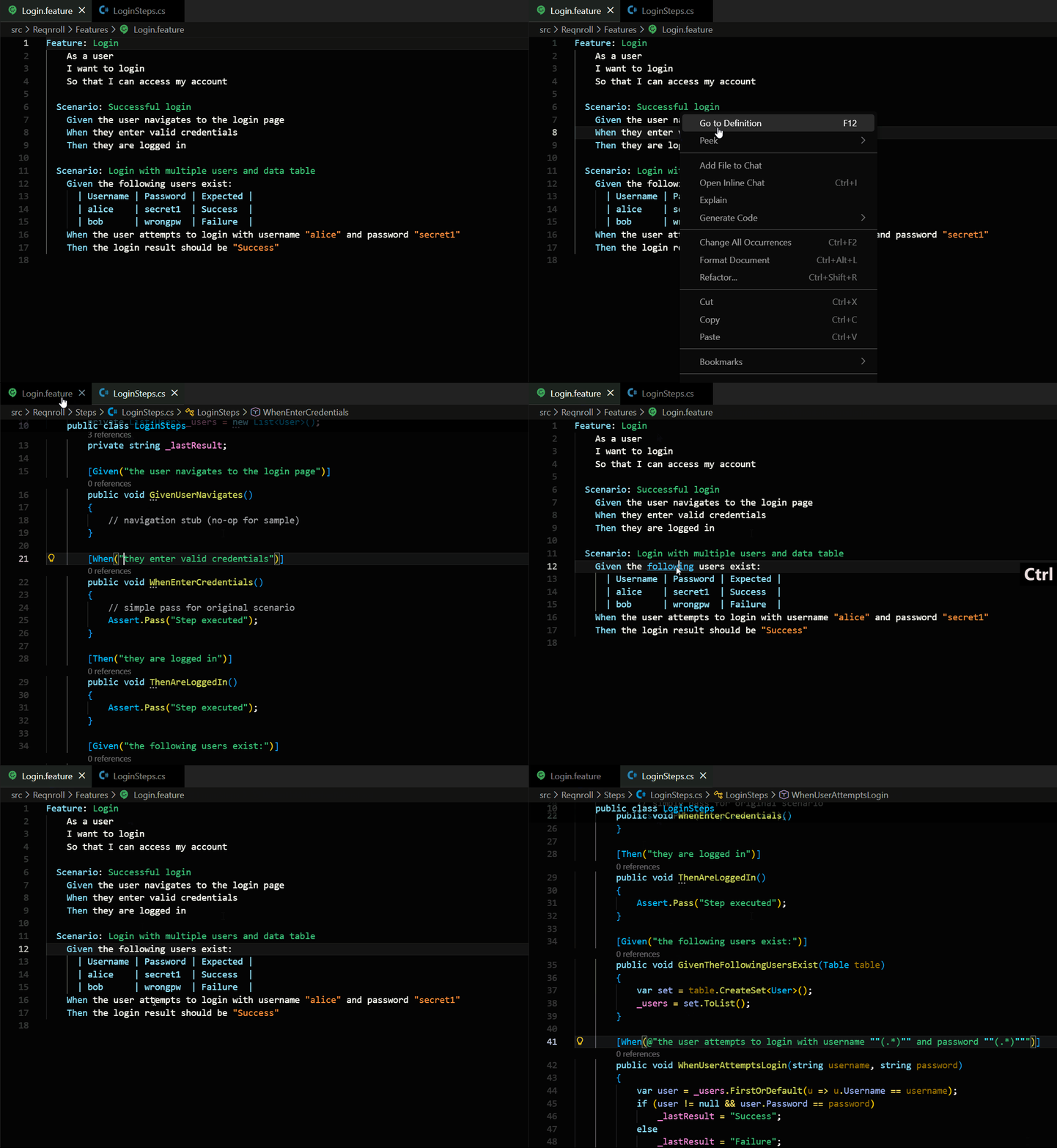
Jekyll2026-03-05T23:55:33+00:00https://danny-briskin.github.io//feed.xmlKnowledge VaultArticles about Information Technologies by Danny BriskinNavigating BDD: Connecting Feature Files to Code with Ease2026-03-04T08:40:30+00:002026-03-04T08:40:30+00:00https://danny-briskin.github.io//vscode/2026/03/04/navigating-bdd-connecting-feature-files-to-code-with-ease
Danny Briskin, Senior Software Developer in Test
Navigating BDD: Connecting Feature Files to Code with Ease
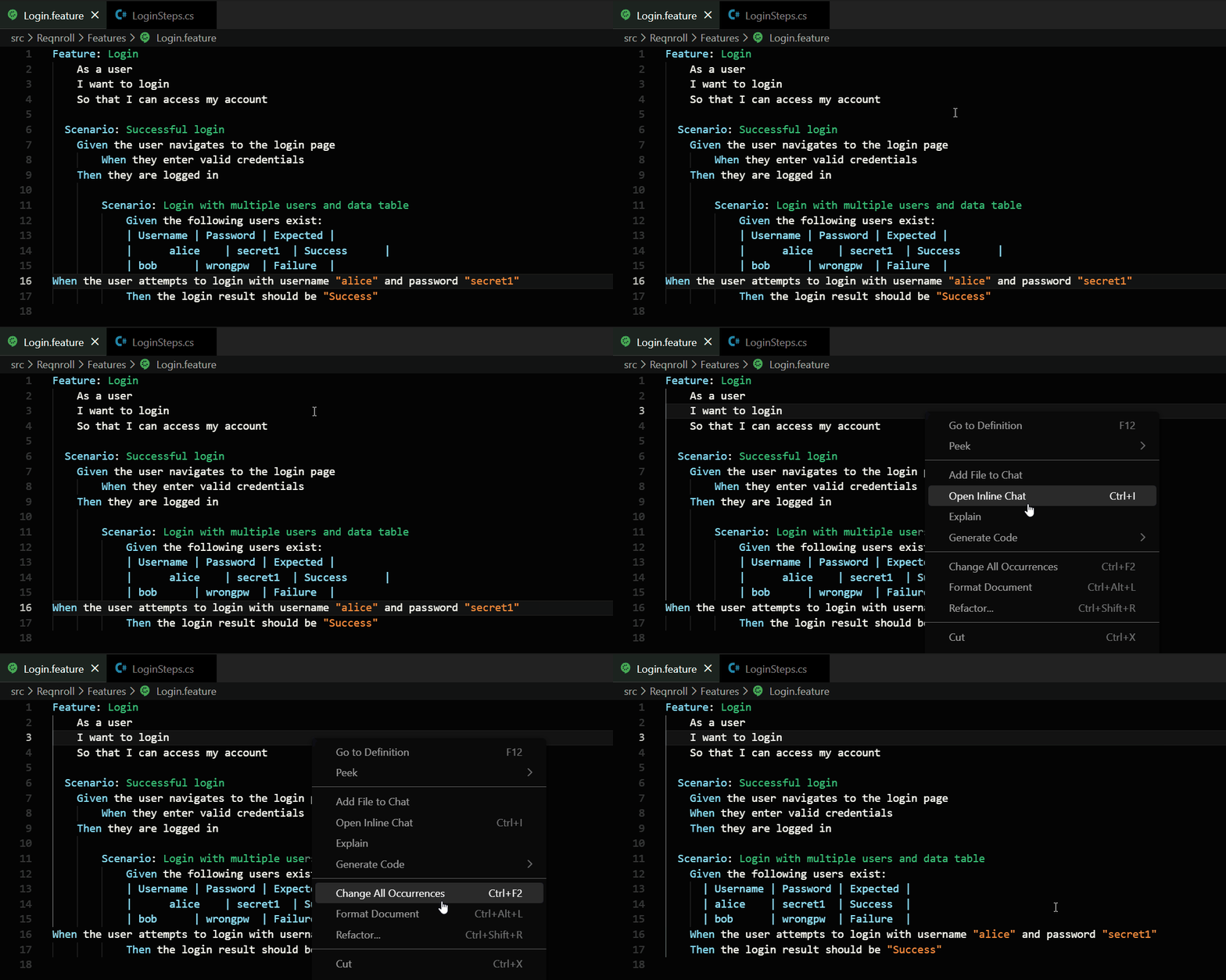
In the world of software testing, we use something called Gherkin. It is a way to write test steps in plain English (or many other languages) so that everyone can understand what the software is supposed to do.
But there is a catch: those plain English steps have to “talk” to real computer code. For a developer, finding which piece of code belongs to which step can be like hunting for a needle in a haystack. I built Gherkin Step Navigator to make that search disappear.
Two Worlds, One Engine
The primary hurdle in BDD (Behavior Driven Development) tooling is that human language is messy, while computer code is very strict.
1. The Built-In Language Engine
Gherkin is unique because it is written in natural human languages. To make this extension truly universal, I didn’t just focus on English. The extension comes pre-loaded with a comprehensive list of keywords for over 70 different languages.
Whether you are writing a test in English (Given), Spanish (Dada), or German (Angenommen), the extension already knows what those words mean. It uses this internal dictionary to instantly recognize a test step as soon as you type it, allowing the navigation to work across global teams without any extra setup.
2. Finding the Code
On the other side, we have the programming code. Developers use special “tags” or “labels” to link code to a step. My extension is designed to recognize these labels across different languages. Whether you are using C#, Java, or Python, the engine knows how to find where the work happens.
Deep Dive: The Three Pillars of the Architecture
The extension is built on three main systems that work together to make navigation feel like magic: the Indexer, the Cache, and the Matcher.
1. The Background Indexer
When you open a project, you don’t want to wait for minutes while the tool “loads.”
Smart Scanning: The Indexer runs in the background. It quickly scans your project files for those special code labels.
Resource Awareness: It is smart enough to ignore “junk” folders like node_modules or build output folders. This prevents your computer from slowing down or getting “stuck” on thousands of irrelevant files.
Real-Time Updates: If you add a new step or change an old one, a “file watcher” tells the Indexer to update that specific file immediately. Your navigation map is always up to date.
2. The In-Memory Step Cache
The Cache is where the “map” of your project lives.
Instant Lookup: Instead of searching your hard drive every time you click a step, the extension looks at a fast list in your computer’s memory. This list says: “This specific step name lives in this file, on this exact line.”
Efficiency: By storing this map in memory, the “Go to Definition” action becomes nearly instantaneous, even in massive projects with thousands of steps.
3. The Intelligent Matcher
Steps often have variables, like numbers or names (for example: “I have 5 items”, “User navigates to ‘Orders’ page”).
Pattern Recognition: The Matcher is the brain that understands these patterns. It converts common human-readable patterns into a language the computer can search quickly.
Accuracy: It ensures that a step in your feature file finds the correct code, even if the code uses complex “regex” or placeholders.
Precision Navigation: No More “Drifting”
One of the most annoying bugs in other tools is “navigation drift” - where you click a step, and the editor takes you to the right file, but the wrong line.
Finding the Spot: Most tools just look for the line number. This extension calculates the exact position of the text, counting every character.
Handling Systems: Different computers save files in different ways (specifically how they handle “enters” or line breaks). This extension handles both Windows and Mac styles perfectly.
The Control-Click: Because of this precision, you can simply Control-Click (or press F12) on any step. The extension checks its map and takes you straight to the implementation.
Keeping Things Neat: Formatting and Colors
I also wanted to make sure the test files themselves stayed easy to read.
Beautiful Tables: If you have a table of data, the extension automatically measures your columns and lines up all the pipes (|) so they look like a clean spreadsheet.
Great Colors: It uses colors to highlight variables, tags, and comments. This makes it easy to spot mistakes before you even run your tests.
Perfect Spacing: It fixes the indentation of your text (moving Scenarios and Steps to the right spots) so everything looks professional.
]]>Efficient Test Discovery in Large Codebases: Combining LLMs with Classical ML Algorithms2025-09-23T08:40:30+00:002025-09-23T08:40:30+00:00https://danny-briskin.github.io//llm/2025/09/23/combining-llm-traditional-ml
Danny Briskin, Quality Engineering Practice Manager
The Challenge: Limited Context Windows
Large Language Models (LLMs) such as GPT are reasoning-powerful, yet only have a limited context window (say, 8k-128k tokens depending on the model).
In test automation in real-world scenarios, this is a bottleneck. Suppose you have tens of thousands of automated tests in your codebase.
If a user says:
“I need to test the login area with multiple failed attempts”
you want to return the most relevant tests that already exist. However, you can’t just hose the entire test suite into the LLM - there isn’t sufficient memory.
So, what do we do?
We combine classical ML/NLP algorithms with LLMs to pre-filter first and then reason.
Step 1 – Topic Detection
First, we extract the topic from the user’s query. This helps us match the query with the structure of existing tests.
a single query to a LLM can be used as well at this point
fromsklearn.feature_extraction.textimportTfidfVectorizerqueries=["I need to test the login area with multiple failed attempts"]tests=["test_login_success","test_login_failed_attempts","test_password_reset","test_account_lockout"]vectorizer=TfidfVectorizer()X=vectorizer.fit_transform(tests+queries)# Compute cosine similarity between query and tests
fromsklearn.metrics.pairwiseimportcosine_similaritycos_sim=cosine_similarity(X[-1],X[:-1])print(cos_sim)
This gives us a first-pass ranking: “test_login_failed_attempts” is the winner.
Step 2 – Candidate Filtering
Knowing that the query subject is “login/authentication”, we filter the repository.
Algorithms:
Cosine similarity on embeddings → top semantic match.
Longest Common Subsequence (LCS) → useful if test names follow conventions.
Edit Distance (Levenshtein) → identifies typos in queries/test names.
Now we have candidates instead of the entire repository.
Step 3 – LLM Refinement
Finally, only run candidate tests through the LLM and allow it to refine, filter, and suggest enhancements:
Prompt Example:
User wants: "I need to test the login area with multiple failed attempts."

Candidate tests:
1. test_login_failed_attempts
2. test_account_lockout
3. test_login_success

Question: Which tests are most relevant? Suggest if any coverage is missing.
LLM Output:
Most relevant: test_login_failed_attempts, test_account_lockout.
Less relevant: test_login_success.
Missing: A test for captcha bypass after repeated failures.
The Hybrid Workflow
Putting it together:
+------------------+
|   User Query     |
+------------------+
         |
         v
+------------------+
| Topic Detection  |
| (TF-IDF, Embed.) |
+------------------+
         |
         v
+---------------------------+
| Candidate Filtering       |
| (Cosine, LCS, Edit Dist.) |
+---------------------------+
         |
         v
+------------------+
|  LLM Refinement  |
+------------------+
         |
         v
+---------------------------+
| Suggested Relevant Tests  |
+---------------------------+
This approach:
Maintains LLM inputs small.
Ensures fast retrieval.
Trades off on deterministic filtering and generative reasoning.
Why Not Just Use the LLM Alone?
Context window limit – you can’t put the whole test suite in.
Efficiency matters – looping all tests through the LLM is expensive.
Reliability – algorithms provide deterministic filtering before involving the LLM.
Generalizing Beyond Tests
This pattern applies in many contexts:
Knowledge base search (support tickets, FAQs).
Document retrieval (legal, medical, financial).
Conversational memory management.
Conclusion
Traditional ML/NLP algorithms are still important - they make LLMs practical in real-world systems.
In our test automation example, cosine similarity and sequence matching help narrow down thousands of tests to a few. The LLM can then reason over these results.
The result:
Faster.
Cheaper.
More accurate.
Hybrid systems that use traditional algorithms for retrieval and LLMs for reasoning are the future of agent design.
]]>AI Makes Life Easier - Don’t Let It Make Your Brain Lazy2025-06-28T11:40:30+00:002025-06-28T11:40:30+00:00https://danny-briskin.github.io//ai/2025/06/28/ai-makes-life-easier
Danny Briskin, Quality Engineering Practice Manager
How I Got Into AI (and Why I Love Tech)
I’ve always considered myself an innovative person. My curiosity for new technology started over 25 years ago, during my university days. I was fascinated by neural networks—long before they became a trend. I explored them in pet projects and stayed engaged with their evolution.
So when modern AI tools like ChatGPT, DeepSeek, and Gemini became available, I started using them right away. Because of knowledge and experience in IT, I could clearly see their strengths and weaknesses. These tools helped me achieve better results and often made my work faster and easier.
An Interesting AI Coding Experience
Recently, I was working on a project that required writing code in a technology I hadn’t used for more than five years. Instead of refreshing my memory, I decided to ask one of the popular LLMs to generate this code for me. It created more than 400 lines of good, working code, and I was fully satisfied. I merged the code into the project and moved on.
Then, the next day, I had to implement a similar task. At first, I began coding it myself, out of habit. Then I realized - wait, why not use AI again? So I did, and once again, the results were great.
But then, on another day, I found myself writing code manually again - without thinking. Why? The AI-generated code had been good. It worked. So why didn’t I turn to AI first this time?
I began to reflect. The action felt unconscious, like my brain just defaulted to the old way of working. Was it habit? Resistance to change? Or something deeper?
A Scientific Research About Over Relying on AI
Curious about why I kept returning to manual work despite AI’s success, I began looking into research about how AI affects our thinking. That’s when I came across a fascinating study: Your Brain on ChatGPT: Accumulation of Cognitive Debt when Using an AI Assistant for Essay Writing Task.
The research explored how using AI for writing tasks affects our memory and brain activity. It introduced the term “cognitive debt” - a side effect of letting AI do the hard thinking for us. Here’s what it means:
Your brain skips a workout. When AI does the thinking, your brain doesn’t engage or strengthen the skills needed for memory and reasoning.
Learning doesn’t stick. People who used AI couldn’t recall what they “wrote” because their brain didn’t actively process the material.
Long-term skill decline. Relying on AI too much may weaken problem-solving abilities over time.
My Personal Realization
This is exactly what happened to me. I’ve always kept my brain active, learning constantly. But suddenly, AI was doing all the work. Naturally, my brain resisted - trying to stay in shape by forcing me to think instead of relying on automation.
Out of curiosity, I re-checked the AI-generated code. It still worked fine, but on closer review, I spotted inefficiencies and logic I would’ve handled differently. Why didn’t I see them earlier? Most likely, because I was mentally “checked out.” The job seemed “done,” so I didn’t dig deeper.
When AI writes an email for me, I review it carefully. But when it generates 400 lines of working code, it’s harder to stay vigilant - especially when the output already looks good.
What Should We Do?
Should we stop using AI? No. The genie is out of the bottle. But we should treat AI like a junior team member - useful, knowledgeable, fast, but still learning. Just like we guide junior developers, we must review and improve what AI creates.
We need to stay critical, think actively, and not outsource our brain. If we blindly accept AI outputs, we risk losing the very skills that made us effective in the first place.
Conclusion: Stay Human
AI is a powerful tool - but not a replacement for thinking. Don’t stop using your brain. Don’t stop reviewing, questioning, learning. Let AI help, but don’t let it make you passive.
Don’t stop thinking. Train your brain. Be human.
]]>AI’s Next Lesson: Who Will Teach the Teacher?2025-06-01T11:40:30+00:002025-06-01T11:40:30+00:00https://danny-briskin.github.io//ai/2025/06/01/ai-next-lesson-who-will-teach-the-teacher
Danny Briskin, Quality Engineering Practice Manager
Introduction
As more people use Artificial Intelligence (AI) tools, fewer people are using services run by humans. A very noticeable example is the Stack Overflow website, which is much less active now. This trend poses significant challenges for the continued improvement of AI and its ability to provide dependable results. It also jeopardizes easy access to accurate technical knowledge..
From Human Communities to AI Assistants
To understand this shift, we first examine why Stack Overflow’s use has decreased. Traditionally, Stack Overflow operated as a key online community where users could ask IT-related questions and usually receive quick responses from professionals. Many experts willingly shared their knowledge there at no cost, often motivated by a system of reputation points earned through helpful contributions. While users needed to register and follow strict posting rules, the quality of answers often justified the effort.
Today, Large Language Models (LLMs) like ChatGPT offer a simpler way to get answers immediately. Users can refine questions with more details and explore different answers interactively, a flexibility not present on Stack Overflow. Furthermore, Stack Overflow users sometimes faced negative feedback from the community for questions perceived as low-quality or redundant. LLMs, in contrast, offer a judgment-free interaction.
AI tools have become effective aids for software engineers. For instance, LLMs can help generate initial drafts for requirements, user stories, system architecture, or test cases. Additionally, many code assistance tools integrated into Integrated Development Environments (IDEs) use AI to increase developer productivity. Overall, LLMs provide quick and often dependable support when needed.
AI’s Reliance on Human-Generated Knowledge
This situation raises an important question regarding potential downsides. The effectiveness of LLMs, especially in software engineering, is not accidental. These AI models achieved their current capabilities by being trained on extensive and specific datasets. A significant portion of this training data, particularly for coding tasks, was sourced directly from platforms like Stack Overflow and the vast amounts of human-written code available in public repositories.
Potential Effects of a Shrinking Knowledge Base
If the trend of declining use of human-to-human Q&A websites continues, the publicly available collection of expert knowledge, essential for AI training, will significantly decrease. While human expertise will still exist, its accessibility for training AI models will be reduced.
The absence of active platforms like Stack Overflow could hinder the ability of future AI versions to learn about new developments. Some might suggest that LLMs can infer new information from existing data. However, LLMs are designed to generate responses even with limited input. If fresh, relevant data is scarce, an LLM might produce an answer based on its older training. Such an answer could sound convincing but be inaccurate or inapplicable, a phenomenon known as “hallucination,” which is difficult to prevent.
LLMs do not possess human-like understanding; they identify patterns and combine information from their training data, which can sometimes produce seemingly new outputs. However, their capacity to provide correct and useful information for new or fast-changing technical areas depends heavily on up-to-date and varied training data. Without new information reflecting current developments, LLM-generated solutions might be based on old or incomplete patterns.
Consider a scenario where a new version of a widely used programming language or database system is released. Without ongoing human discussion and problem-solving on public platforms, AI models might provide information relevant only to older versions or, worse, generate incorrect solutions. This raises the question of how AI will learn about these new technologies.
Furthermore, while popular technologies like Java or Python have large communities generating vast amounts of data, niche tools have much smaller user bases and fewer experts. The challenge of training AI effectively for these less common technologies becomes even greater with a reduced flow of new human-generated knowledge.
Difficulties in Keeping AI Knowledge Current
Recently, efforts have begun to update existing LLMs by fine-tuning them with new information and identifying outdated content. However, this process is complex. While it’s possible to correct general knowledge gaps, such as updating an LLM with the name of a newly elected official, addressing highly specialized technical subjects is much harder. It raises questions about the number of experts required to continually update AI across all fields of knowledge.
The community environment of platforms like Stack Overflow encouraged knowledge sharing. Motivations such as helping others and gaining recognition led to the organic creation of a large, high-quality dataset. This type of motivation is less apparent in human-AI interactions. Engineers may use AI for their own tasks, but widespread, voluntary contributions to train or correct AI systems are unlikely without clear rewards or a sense of community. This loss of intrinsic motivation weakens a key method for obtaining ongoing training data.
Furthermore, some LLM developers believe that most easily available public text data suitable for training has already been used. To improve AI further, it might be necessary to use real-time information or private data sources. For specific areas like software engineering, obtaining up-to-date, practical knowledge could mean analyzing private code, internal documents, or even developer activities. Such methods present major challenges regarding cost, privacy, ethics, and scalability, potentially making LLM usage too expensive.
Conclusion
The ease of using AI tools like LLMs is unintentionally causing a decrease in the use of important human-based knowledge platforms like Stack Overflow. This situation presents a key problem: the AI systems that depend on these platforms are also contributing to the loss of their essential data sources. This can lead to serious outcomes, such as AI development slowing down, more instances of incorrect or fabricated AI-generated information, specific problems keeping AI updated on new and specialized technologies, and major challenges in finding practical, ethical, and affordable ways to refresh AI knowledge.
This highlights the ongoing importance of promoting mutual support among software engineers, as their collective expertise will remain an indispensable resource. While AI offers unprecedented capabilities, the dynamic, evolving nature of human problem-solving and collaborative learning remains unique. Ensuring that this human element continues to thrive and contribute to the collective knowledge pool will be essential for navigating the complexities of future technological development.
]]>Coding assistance AI tools2024-07-24T11:40:30+00:002024-07-24T11:40:30+00:00https://danny-briskin.github.io//ai,/copilot,/coding/assistance/2024/07/24/coding-assistance-ai-tools
Danny Briskin, Quality Engineering Practice Manager
Introduction
In recent years, artificial intelligence has significantly transformed the landscape of software development by introducing AI coding assistance tools. These tools, powered by advanced machine learning algorithms, are designed to enhance productivity, reduce errors, and streamline the coding process. By providing real-time suggestions, auto-completions, and intelligent code analysis, AI coding assistants are revolutionizing the way developers write and optimize code. This technology not only accelerates the development process but also empowers developers to focus on more complex problem-solving tasks, thereby fostering innovation and efficiency.
Are those tools really that powerful? Let’s figure that out.
AI powered tools
There are plenty of tools that can be used for software development process, starting from idea generation to code generation and testing. Here is a list of most know ones
Tools for ideas generation and concepts creation
ChatGPT - A universal assistant for generating ideas and answering complex queries.
GlueCharm - A tool for creating user stories and managing product backlogs.
Codeium - Specializes in both code and text generation, offering advanced capabilities for developers.
In this article I will concentrate on coding assistance tools only.
The Pros of AI tools in Software Development
AI coding tools have become an integral part of modern software development, offering a range of benefits:
Affordability: Many AI tools provide a trial period or even a free tier, making them accessible to a broad audience.
Deployment Options: These tools often offer cloud-based solutions and on-premises versions to suit different organizational needs.
Ease of Use: Installation is typically straightforward, and most tools support plugins for popular IDEs, integrating seamlessly into existing workflows.
Contextual Suggestions: AI tools utilize predefined models and analyze your codebase, including comments, to provide context-aware suggestions.
Security: Many AI tools are tested for security compliance and have relevant certifications.
Specific Use Cases:
Function Documentation and Comments: AI tools are extremely useful for generating javadoc, docstrings, and in-code comments, especially for non-native English speakers.
Code Predictions: These tools are helpful for generating boilerplate code, but when the code is supposed to be more sophisticated, the usefulness of tools becomes questionable.
Code Completion: AI code completion is useful but built-in IDE code completion tools are currently more robust and faster.
Git Commit Messages: Some tools can analyze changes between commits, though they are not very robust.
Code Explanation: AI tools provide valuable insights for junior developers, making them very useful in this aspect.
Unit Test Generation: Many tools excel in generating unit tests, offering great value there.
Code refactoring: - tools are quite useful, but developer needs to put a lot of efforts to explain what is needed and the result is questionable in most cases.
Code Assistance with Codeium – Use Case Analysis
AI-powered tools such as Codeium have proven to be effective in generating code documentation, ranging from simple to more complex cases. For example, the following Python docstring was entirely generated by AI:
"""
Sends a REST request to the specified endpoint with the given parameters.

Args:
    endpoint_qualifier (str): The identifier of the endpoint to send the request to.
    endpoints_config (dict[str, Any]): A dictionary containing the configuration for all endpoints.
    replacements (dict[str, dict[str, str]], optional): A dictionary containing replacements for the payload and path of the request.
    **kwargs: Additional keyword arguments to customize the request.

Returns:
    Response: The response object containing the result of the request.

Raises:
    ValueError: If the endpoint qualifier is invalid or if the authentication or method is not specified for the endpoint.
    Exception: If the expected status code does not match the actual status code of the response.
"""
On the other hand, this docstring output
although highly useful, still requires human review for completeness and correctness.
Code Predictions
The code prediction functionality provided by Codeium is generally effective, particularly in scenarios involving repetitive tasks like REST requests. It efficiently predicts the next line of code and offers useful suggestions.
However, if a prediction is declined and replaced with a manually written line, the tool will still attempt to predict the same suggestion for the subsequent line, which can become frustrating for the developer after multiple occurrences.
Code Completion
The code completion feature is closely related to prediction but often lacks in variability and performance. For example, when a user starts typing, the AI might suggest a single line of completion, as seen in the grey suggestion below:
In contrast, the built-in IDE completion tools typically provide multiple options, as seen in the popup shown in the same scenario. This demonstrates that while AI completion can be helpful, its current implementation still trails behind traditional code completion systems in terms of flexibility and speed.
Git Commit Messages
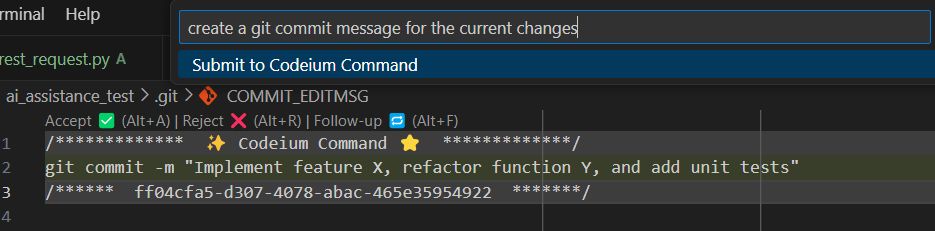
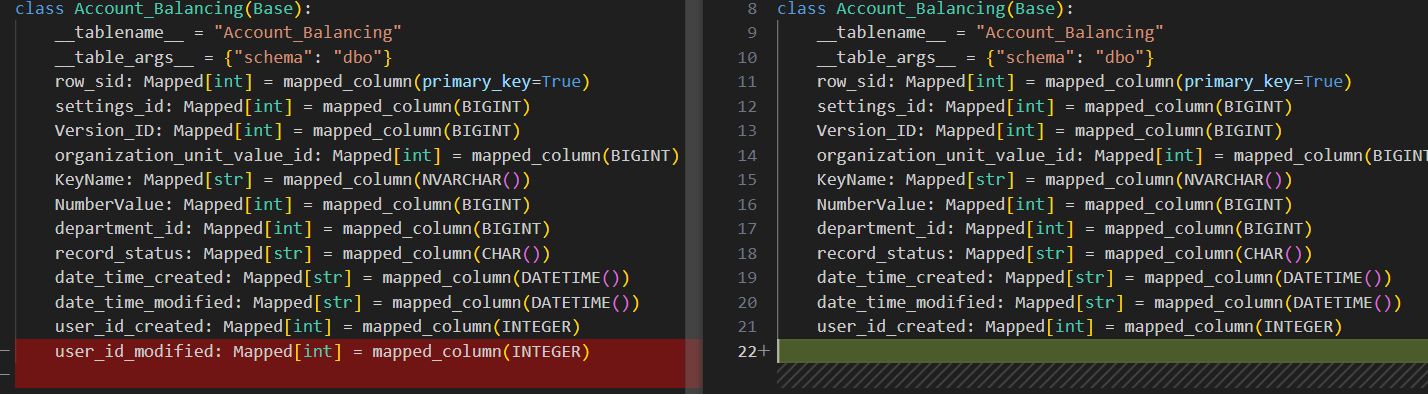
The AI’s ability to assist in generating Git commit messages is somewhat limited. When analyzing changes in the deletion of a class field (a mapped database table column, for instance), the suggested commit messages remain very basic, often failing to capture the full context of the modification. For example:
When the change was in deletion of class field (mapped database table column):
The proposed commit messages were (white was human printed, grey – AI propositions):
Or:
As seen in this instance, the AI lacks the sophistication to create insightful commit messages and typically defaults to generic or overly simplistic suggestions.
Code Explanation
This feature is highly beneficial, especially for junior engineers. The AI can identify third-party libraries and explaining their methods based on a minimal codebase. This ability to provide clear, context-aware explanations can significantly accelerate the learning curve for less experienced developers.
Unit Test Generation
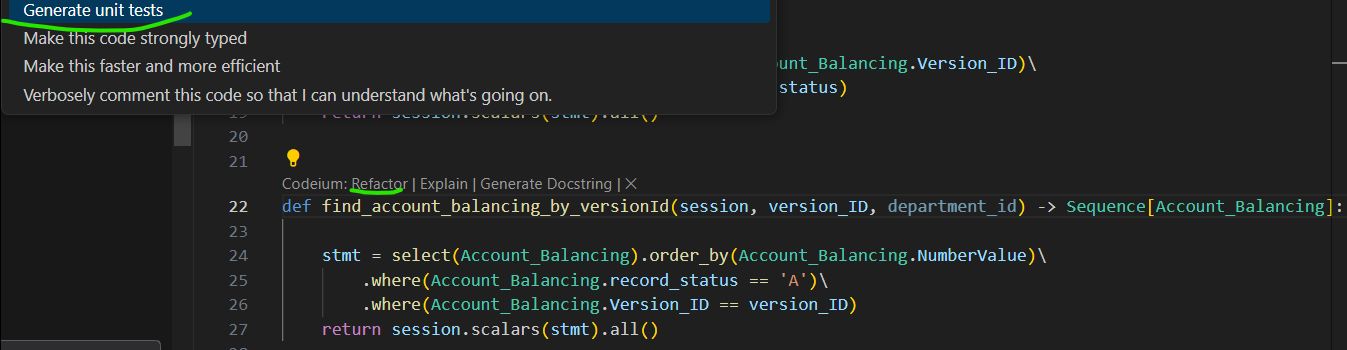
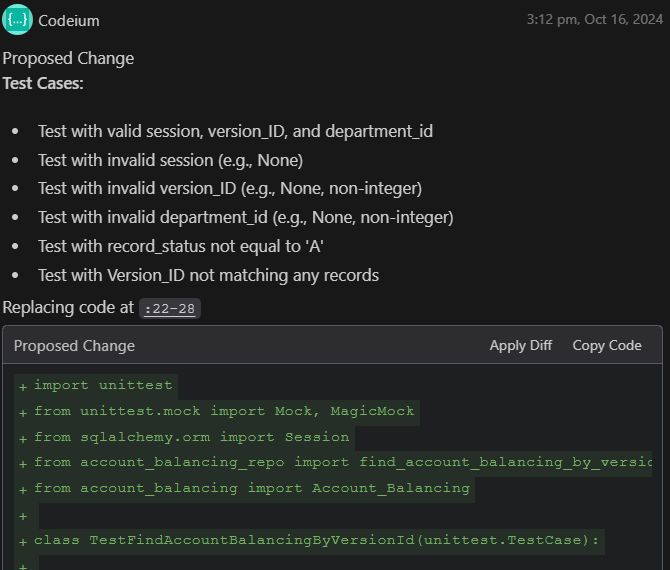
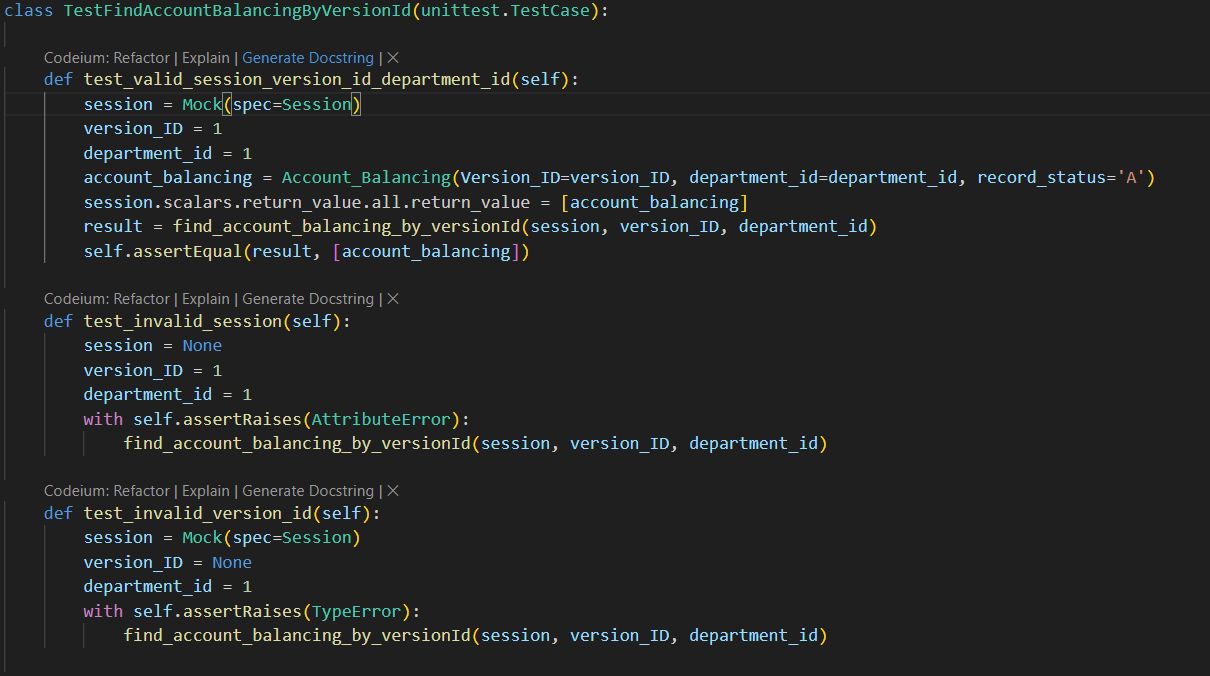
AI-generated unit tests can be valuable as a starting point. The AI is proficient in producing a list of possible test cases and generating basic code structures for unit tests. For instance, when provided with a function to test, the AI was able to suggest relevant tests and create functional test cases.
While the tests may need further customization and refinement, the foundation provided by AI can save developers time and ensure greater test coverage.
Code Refactoring
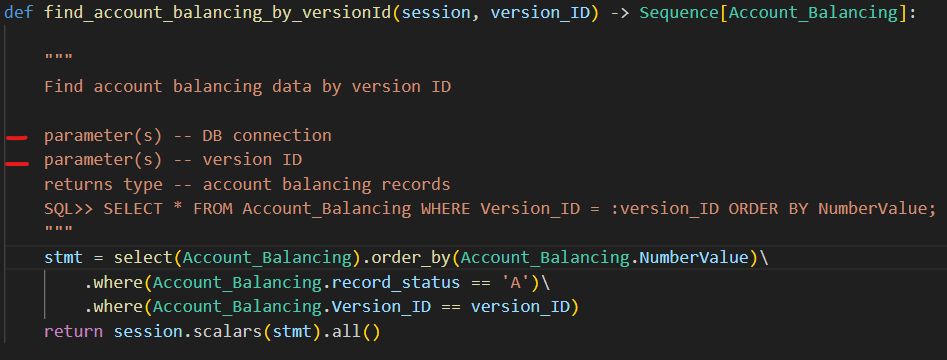
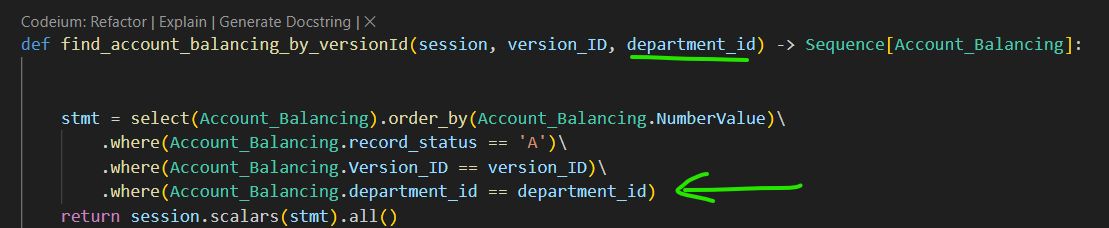
For simple and well-understood scenarios, AI-driven code refactoring works efficiently. For instance, when refactoring the following function:
A refactoring with:
resulted in the next code:
A parameter was added, the correct field name was found in the Account_Balancing class, correct function (where) was called.
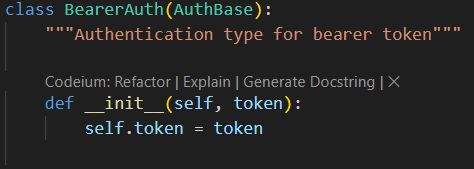
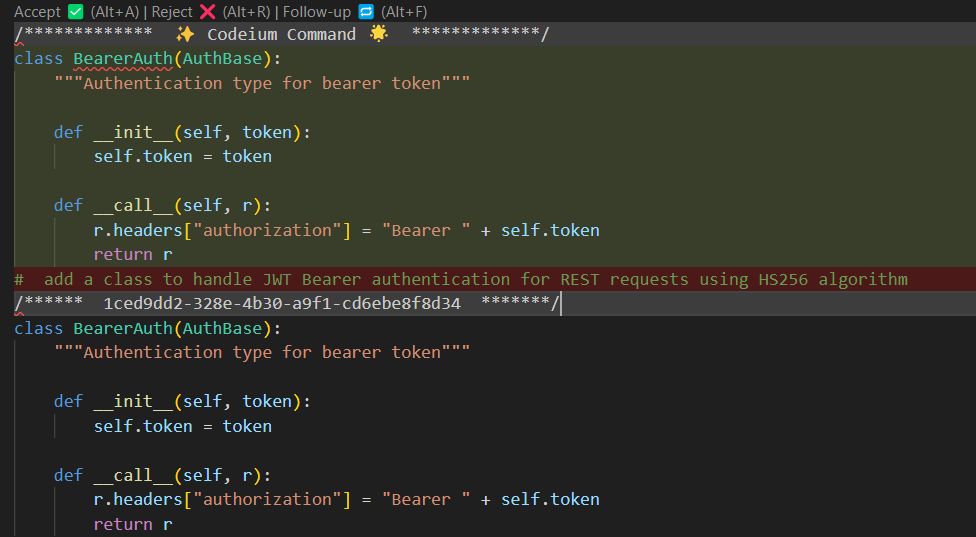
But, if the scenario becomes a bit more complicated, the AI fails. Trying to add a JWT token type authentication functionality along with existing Bearer Authentication:
Here you are (that’s right, it’s a carbon copy):
Even a straightforward call to an existing function from the same file results in complete guesswork from the AI, as if it is uncertain about the expected outcome. For example:
Using the rest_request function from this file, send a POST request to http://localhost:8080/endpoint with payload {"onekey": "twovalue"}
The answer was:
The function to call looks like this:
As a result, the parameter usage was entirely incorrect.
The Cons of AI Tool in Software Development
Despite their advantages, AI coding tools have several drawbacks:
Immature Plugins: IDE plugins need improvement to become more reliable and feature-rich.
Performance Issues: The analysis required for suggestions can lead to slow performance, affecting productivity.
Data Privacy Concerns: There is a risk of data leaks, as user inputs may be used for model training by AI tool creators.
Lack of Open Source: Most tools are not open source, raising concerns about potential information leaks, even with on-premises solutions.
Training Data Quality: The models are trained on unknown datasets, which may not adhere to best coding practices.
Limited of Precise Tuning: While AI tools can use your codebase for suggestions, they often focus on the current file rather than the entire project.
Annoying Behavior: AI tools may repeatedly suggest inappropriate code, causing frustration for developers.
General Concerns about AI Tools
Reliability: AI tools can generate erroneous or unsafe code, necessitating thorough code reviews and undermining the idea of “machine-generated code.” Complex tools may create code that contradicts programming principles.
Code Support and Maintenance: AI-generated code may be overcomplicated, use uncommon approaches, and vary among developers, making collaboration challenging. Refactoring AI-generated code can be difficult.
Continuous Improvement: AI is trained (at least it is supposed to be) on syntactically correct elements, but this doesn’t guarantee optimal performance or maintainability.
Loss of Control: Developers may feel disconnected from the code, leading to their skill deterioration and reduced ability to handle AI errors.
Habits and Motor Memory: Experienced developers rely on motor memory for IDE tasks. AI tools disrupt this pattern, requiring more time for decision-making and returning to the original workflow.
Incorrect Suggestions: AI tools may offer irrelevant code suggestions that appear correct, leading to potential coding errors that regular code completion tools would avoid.
Summary
AI coding assistance tools have revolutionized software development by enhancing productivity, reducing errors, and streamlining the coding process. These tools provide real-time suggestions and intelligent code analysis, allowing developers to focus on complex problem-solving. AI tools offer several benefits, including affordability, ease of use, and contextual suggestions. They excel in specific tasks such as function documentation, code predictions, unit test generation, and code explanations, particularly aiding non-native English speakers and junior developers.
However, AI tools also have significant drawbacks. They can suffer from performance issues, data privacy concerns, and immature plugins. Most tools are not open source, leading to potential information leaks and questionable training data quality. AI-generated code can be unreliable, challenging to maintain, and often requires thorough review. Developers may feel a loss of control over their code, and AI tools can disrupt their workflow and motor memory. Additionally, incorrect suggestions can lead to coding errors that are not easily caught.
Overall, while AI tools can greatly assist in software development, their limitations and risks must be carefully managed to ensure reliable and efficient coding practices.
]]>Test Automation Scope: Balancing Value and Complexity with End-to-End Testing2023-08-16T11:40:30+00:002023-08-16T11:40:30+00:00https://danny-briskin.github.io//testing/2023/08/16/balancing-value-and-complexity-e2e-testing
Danny Briskin, Quality Engineering Practice Manager
Introduction
In the realm of Quality Assurance (QA) automation, a recurring conundrum faces Software Development Engineer in Test professionals, at the outset of each project or even within Agile Sprints: What is the optimal scope of automation? The notion of “automating everything” is a common refrain from clients; however, deciphering the precise scope of “everything” remains a challenge. The process involves a judicious selection of test types for automation, a task that extends beyond mere mechanical execution..
Strategies for Determining Automation Scope
The Simple and Direct Approach: Full Automation
This method entails mirroring manual test cases by automating each one. This approach provides comprehensive coverage, a favored aspect by project managers, and establishes a one-to-one mapping between manual and automated test suites, enhancing reporting capabilities.
Of course there is a drawback. This strategy often yields an extensive automation test suite, often marred by redundant or partially redundant test cases, leading to increased complexity and inefficiencies. Many TCs will not add any new value to the automation process and testing in general. For example, if there is a login feature in the system and you need to test a positive scenario. Obviously, you can automate it as a separate scenario but why? I’ll bet 95% of your TC require a successful login, so this part will definitely be tested elsewhere.
The Value-Based Approach: Strategic Automation
This approach involves assessing potential future costs for the development, maintenance, and execution of automated test cases. A critical metric known as the “test value” emerges from the ratio of manual testing expenses to automated testing costs. The “test value” evolves over time, becoming more favorable as development concludes and maintenance diminishes. Less intricate tests, reminiscent of component tests, can swiftly acquire value, while complex End-to-End (E2E) tests may never accrue substantial value due to elevated development and maintenance overheads.
Does it mean that one should automate only high-valued tests and never automate E2E tests?
Notably, E2E tests remain compelling for their demonstrative potential, aiding in securing top management support for test automation endeavors.
Enhancing Test Value through Combination: Unifying Test Cases
Elevating the value of a test case can be achieved by amalgamating smaller tests. For instance, merging a login action with subsequent steps and logout functionality within the same test can optimize development, maintenance, and execution time, while manual effort increases.
This approach has drawbacks:
Challenges arise in tracking these combined test cases within the original manual test suite, as complex one-to-many, many-to-one, or many-to-many relationships between automation and manual tests may arise.
This approach, while increasing value, also introduces complexities by transitioning from component-level tests to broader E2E scenarios. That also increases execution time.
End-to-End (E2E) Tests: Evaluating the Spectrum
End-to-End (E2E) testing is a software testing technique that verifies the functionality and performance of an entire software application from start to finish by simulating real-world user scenarios.
Reasons to NOT doing E2E Automation:
E2E tests demand advanced software development skills, making implementation and maintenance daunting.
E2E testing hinges on application state, necessitating meticulous setup and control of test data.
The comprehensive environment required for E2E tests often involves shared components, adding intricacies.
E2E tests encompass numerous serial steps and typically require considerable execution time.
Execution involves interaction with user interfaces, exacerbating complexity.
E2E tests are frequently executed later within Continuous Integration/Continuous Deployment (CI/CD) pipelines.
The Singular Justification for E2E Automation: Customer-Centric Assurance
E2E tests stand as the sole category of automated tests that offer a genuine demonstration of application functionality aligned with user expectations.
Balancing the Automation Spectrum: Making Informed Choices
Decision Framework:
There is no universal solution, whether embracing or eschewing E2E automation. E2E tests possess undeniable value, yet their challenges are evident.
Total exclusion of E2E tests leaves the testing suite incomplete, potentially missing critical issues only detectable through comprehensive holistic testing.
Guideline from Experience: A Balanced Approach
Based on empirical observations, a pragmatic guideline suggests allocating no more than 10% of the total number of tests and execution time to E2E tests for optimal results in most projects
Summary
In the world of QA automation, deciding what to automate is a perpetual challenge. The “automate everything” mantra requires strategic assessment, with options like comprehensive replication of manual tests or evaluating value-based automation. End-to-End (E2E) tests, though impactful, introduce complexities such as maintenance, execution time, and UI interactions. Balancing E2E and other testing approaches is pivotal for efficient and effective test automation strategies.
]]>Effective Management of Graphical Documentation with Version Control2023-08-02T18:40:30+00:002023-08-02T18:40:30+00:00https://danny-briskin.github.io//testing,/documentation/2023/08/02/effective-management-of-graphical-documentation-with-version-control
Danny Briskin, Quality Engineering Practice Manager
The issue
Maintaining comprehensive documentation in a project is a fundamental concept. For more insights, refer to this article. However, the majority of documents become difficult to manage over time. As the project progresses, outdated documents must be discarded and replaced with new versions. The primary issue lies in the diversity of document formats. From the worst-case scenario of password-protected PDFs to various MS Word formats and even Markdown pages, managing versioning becomes either unviable or severely limited for such documents, particularly for graphical elements.
Implementing Version Control
Being software developers, we are well aware of version control, specifically Git. A clever approach is to leverage Git for managing documents as well. Surprisingly, even binary formats like PDFs and Word documents can be tracked using Git-like versioning. By adopting Markdown for documentation, one can fully exploit Git’s functionality, including branching, merging, and history with changes attributed to specific usernames. This solution can be implemented by maintaining these documents in a separate Git repository, preferably, or even within the codebase if the number of documents is manageable.
The Role of Visuals
Text often falls short in conveying complex information, and thus, we frequently rely on images to provide additional clarity to our content. Technical diagrams are an integral part of project documentation and must be effectively stored and versioned.
Pictures as Text
One viable solution is utilizing the SVG format, which offers a text-based (XML) structure, allowing for easy depiction of various images. However, most project documentation comprises technical diagrams like UML diagrams, and switching to SVG might not be the most practical approach. Another solution is to use LaTeX for document creation, but the learning curve and tools needed for the solution is an overkill for simple diagrams. Instead, we recommend using PlantUML, a simple tool that generates UML diagrams from formatted text documents. PlantUML utilizes SVG conversion in the background, ensuring seamless integration without additional complexities.
Introducing PlantUML
PlantUML is a powerful tool that enables the creation of various UML diagrams along with non-UML diagrams, offering the flexibility to depict virtually anything effortlessly. From Component diagrams with JSON to Gantt diagrams and MindMaps, PlantUML proves to be a versatile solution with a minimal learning curve.
They use SVG conversion in background, so there is no extra magic.
Example: Test Framework Component Diagram
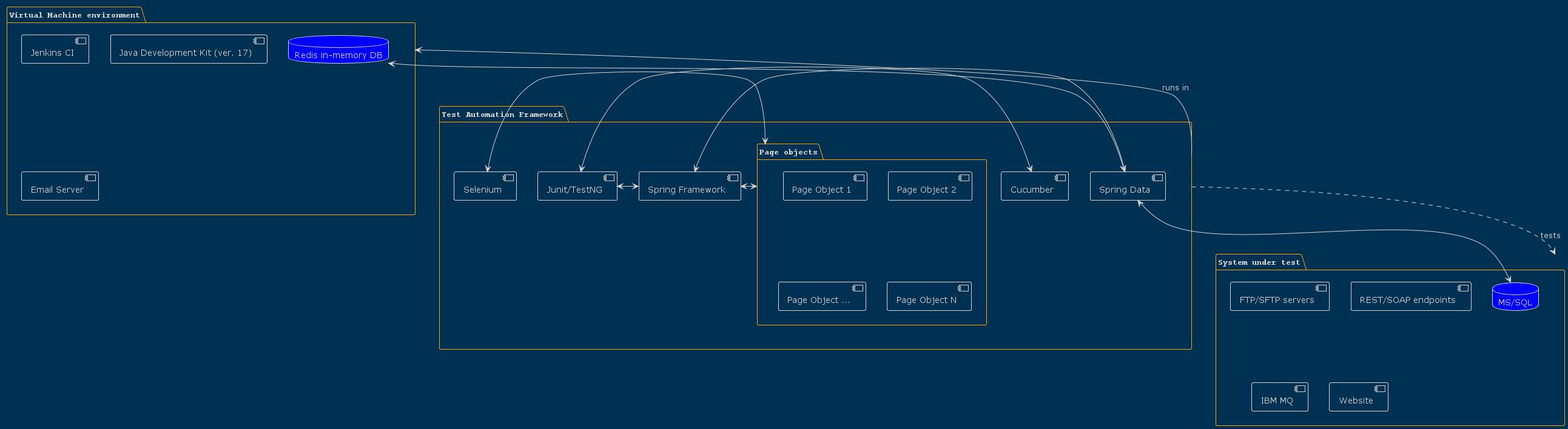
Let’s take the example of creating a component diagram for a test automation framework. You can access the complete file here.
We can define several components within a package as follows:
package "Virtual Machine environment" {
  component [Jenkins CI] as jenkins
  component [Java Development Kit (ver. 17)] as java17
  component [Email Server] as local_email
  database "Redis in-memory DB" as redis
}
We can also create packages inside other packages, and define connections between components:
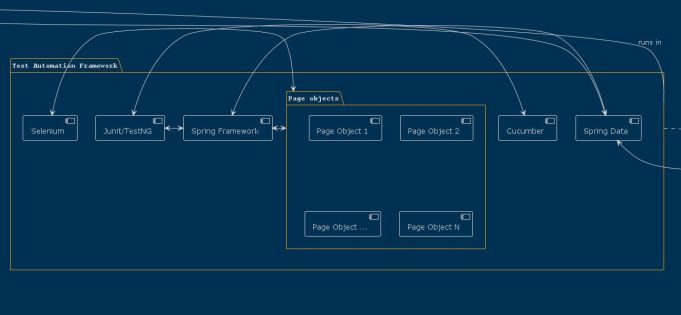
This allows us to define bilateral and unilateral connections between components and packages, resulting in a comprehensive component diagram for the test automation framework.
  junit <-> cucumber
  junit <-> spring

  "Test Automation Framework" -d.> "System under test":tests
Look what we have as a result:
#Example: Usecase Diagram
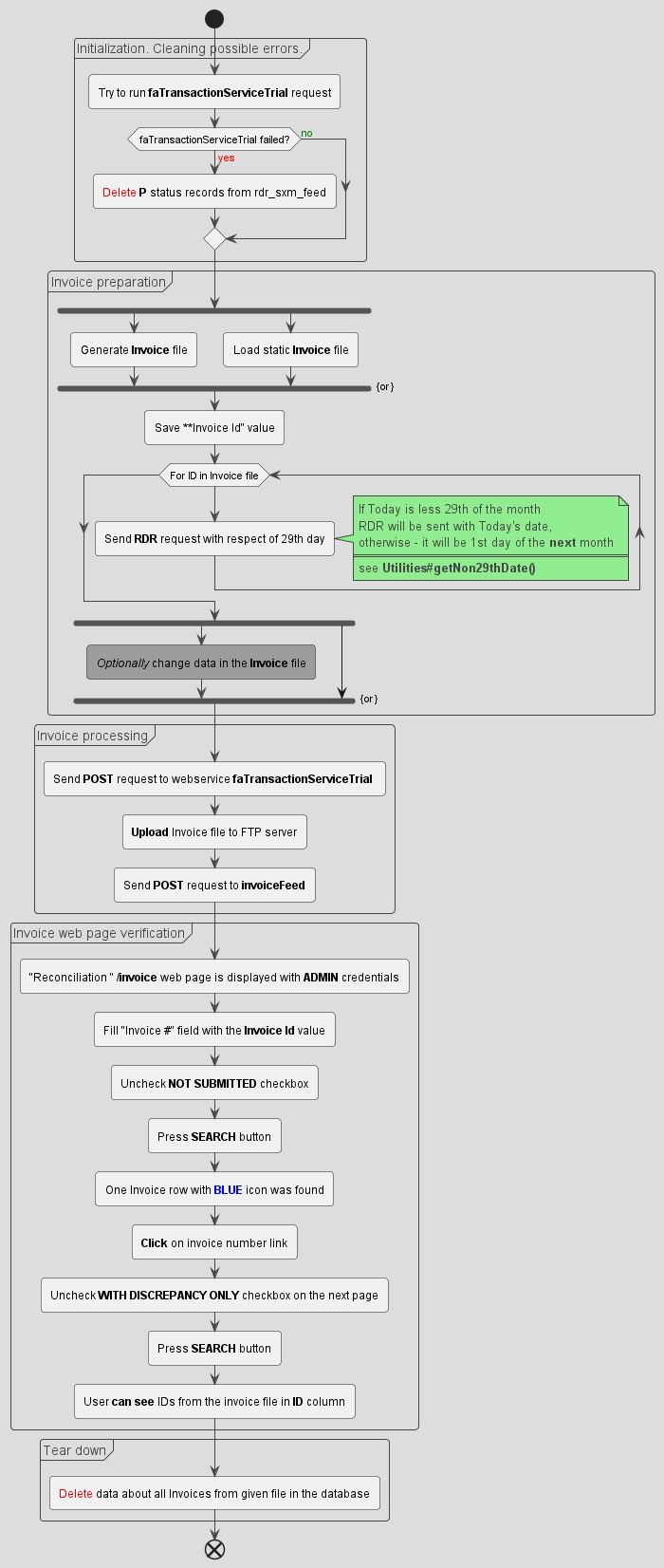
Another application of PlantUML is in creating usecase diagrams, such as the invoicing process diagram. You can download the complete file here .
PlantUML allows the definition of complex elements, like loops and comments, to provide detailed context within the diagram.
Here’s an excerpt from the usecase diagram:
group Initialization. Cleaning possible errors.
:Try to run **faTransactionServiceTrial** request;
if (faTransactionServiceTrial failed?) then (<color:red>yes)
  :<color:red>Delete</color> **P** status records from rdr_sxm_feed;
else (<color:green>no)
endif
end group
A loop and a comment
while (For ID in Invoice file)
  :Send **RDR** request with respect of 29th day;
  note right
    If Today is less 29th of the month
    RDR will be sent with Today's date,
    otherwise - it will be 1st day of the **next** month
    ====
    see <b>Utilities#getNon29thDate()</b>
  end note
endwhile
Here is the result
Summary
By embracing PlantUML and incorporating version control practices, we can effectively manage graphical documentation, ensuring a clear and streamlined approach to project documentation.
]]>Importance of logging in test automation development2023-06-07T18:40:30+00:002023-06-07T18:40:30+00:00https://danny-briskin.github.io//testing/2023/06/07/logging
Danny Briskin, Quality Engineering Practice Manager
The issue
In the realm of software applications, failures are inevitable. The causes of these failures may vary, ranging from issues in the code, logic, data, or the environment itself. However, it is essential to identify the root cause of each failure. While not all failures necessitate immediate changes, distinguishing between different types of failures is crucial.
Typically, developers employ concise error messages that provide potential reasons for the failure. Even in the event of a Blue Screen of Death (BSoD) occurrence, there is valuable information to consider. However, these messages, at best, only provide insights into the current failure situation. They cannot transport us back in time to reveal the state of the system prior to the crash.
Logging? In test automation? Really, why?
While logs have been in existence since the advent of modern computers, it is peculiar that software developers, particularly those specializing in test automation (SDETs), frequently neglect the implementation of proper logging practices within their applications. In my experience, the products developed by SDETs, which encompass test automation frameworks, exhibit a higher likelihood of encountering failures compared to “regular” applications. When confronted with a failure, the common approach is to repeat the test scenario in the hopes of identifying the underlying cause. Although this may prove effective for small test cases that require minimal preparatory work, it becomes considerably more challenging to identify failures in comprehensive End-to-End tests. Consider the scenario where the test suite is executed overnight. How can one accurately reproduce the state of the system during that specific nightly run?
Log everything!
Implement comprehensive logging in your application from the early stages of development. Ensure that log messages are included at significant points in the code, particularly where failures are anticipated. Additionally, incorporate logging at key junctures in the logic branching. If your testing involves a visual component, such as desktop, mobile, or web tests, consider adding relevant screenshots to the logs. Although organizing this sort of logging can be challenging, you can automate many aspects of the process. For further insights on AOP logging and how it can help streamline logging efforts, refer to this informative article.
… but be flexible …
In contemporary logging frameworks, there is an abundance of configuration options available to establish logging setups. This allows for precise control over what information is logged, when it is logged, how it is logged, and where it is logged. It is essential to ensure that the logs encompass all the necessary information required for investigating potential failures. You can customize and define your own mnemonic codes to represent specific events, facilitating easier interpretation. For instance:
In the above example, “[oo]” indicates the starting point, “[><]” - the exit point, “[»]” and “[«]” - method calls and exits respectively, while “[o<]” is for returned value.
Additionally, it is imperative to include the precise date and time of each log event. The log level can also be of great assistance. For instance:
D 20230221050902892
In this example, “D” denotes the log level “DEBUG”, which was used, and the date is formatted as “YYYYMMDDHH24MISSZZZ”. This format proves highly useful when sorting dates in a natural manner.
… do level it up …
Furthermore, it is essential to consider log levels, as they play a crucial role in logging. Implementing a dynamic logging level system allows the code to generate different outputs in the logs based on the specified level. For instance:
TRACE 20230221050902892 [>>] ClassName::methodName1(parameterValue1, (ParameterClass2))
DEBUG 20230221050902892 [o<] [returnedValue] <== ClassName::methodName2()
WARN  20230221050902892 [* ] [returnedValue] is negative!
ERROR 20230221050402892 [* ] [returnedValue] does not meet given criteria (-3<=value<=0)!
CRIT  20230221050902892 [* ] browser quits unexpectedly
If the current log level is set to WARN, only messages with WARN level or higher (ERROR and CRIT) will be displayed.
It is also considered good practice to pass thelog level from outside the application.
… because it is expensive sometimes.
Once logging is integrated into the application, the process does not end there. It is crucial to actively monitor the logs over a specified period. Questions such as the number of lines generated per day and the continued necessity of this information after a certain period (e.g., a week or a month) need to be addressed. Additionally, it is vital to evaluate the performance impact of logging. For example, introducing logging at a specific point may result in a doubling of execution time and the generation of an additional 100MB of logs per day.
Most logging frameworks offer features to automatically archive or manage old logs, and it is important not to overlook these capabilities.
Summary
Incorporating logs into your initial architecture can offer significant benefits by saving substantial time and effort required to investigate the underlying cause of test framework failures. Establishing an efficient log setup can prove invaluable, ensuring comprehensive visibility into the test execution process. By making logs an integral component of your framework design, you can enhance troubleshooting capabilities and reap the favorable outcomes that result from this proactive approach.
]]>Test Automation in multiple versions and environments2023-06-02T18:40:30+00:002023-06-02T18:40:30+00:00https://danny-briskin.github.io//testing/2023/06/02/testing-in-multi-environment
Danny Briskin, Quality Engineering Practice Manager
The issue
In software development projects, it is customary to establish various distinct environments to cater to different objectives. Typically, these include a designated development environment (DEV), a dedicated testing environment (QA), and naturally, a production environment (PROD). In more intricate scenarios, additional configurations such as User Acceptance Testing (UAT) and System Integration Testing (SIT) environments are incorporated. Moreover, in cases where a significant volume of testing activities is involved, it is common to have multiple instances of each environment type
In a normal deployment workflow, new versions of software are deployed in the order:
DEV
SIT
QA
UAT
PROD
Consequently, the PROD environment may have version 1.3 in PROD, while UAT has 1.4, QA - 1.5, SIT - 1.6 and DEV 2.0. Although the version numbers may vary, and there can be more significant gaps between them, the underlying concept remains consistent. Once testing is conducted in a given environment, its respective version is promoted to the subsequent environment, replacing the current version with a “ready-to-deploy” update from the lower environment.
However, certain challenges can arise within this scheme. Testers, including end users, may identify defects within any environment, prompting developers to swiftly generate a hotfix that should be tested as well. Nonetheless, difficulties emerge when ongoing testing is underway in an environment that cannot be interrupted to facilitate the deployment of an updated version. Consequently, the fixed version will need to be deployed to another environment. If there is a scarcity of available environments, a chaotic situation can ensue.
For instance: Suppose a defect is found in the PROD (ver. 1.3), prompting the development team to create version 1.3.1 with the necessary bug fix. But there is an ongoing testing of ver. 1.4 in SIT, so let’s deploy it in QA. Meanwhile, another defect was found in UAT (ver. 1.4), leading the developers to produce version 1.4.1 (that does not include bugfix from 1.3.). The updated version is then deployed back to the UAT environment. At this point, the QA team completes their testing and prepares to deploy version 1.3.1 to UAT, but encounters the ongoing testing of version 1.4.1. Consequently, the SIT environment becomes available, and the decision is made to deploy version 1.3.1 there temporarily, mimicking a UAT environment.
Now we have:
DEV (ver. 2.0)
SIT (ver. 1.4.1)
QA (ver. 1.3.1)
UAT (ver. 1.4)
PROD (ver. 1.3)
Wearing a test automation hat
Let’s consider the scenario where you possess a test automation framework with a comprehensive regression suite, prepared for deployment at any given moment. Being a proficient software developer [in test], you are well-versed in utilizing version control systems. Naturally, you maintain a master (main) branch, housing the most up-to-date codebase. When making modifications to the framework, you adhere to version control guidelines by creating a branch, committing changes, pushing them to the repository, and ultimately generating a Pull Request to merge the changes into the master branch.
Well done!
Assuming that you have made the necessary adjustments to your tests to align with the new bug fixes introduced in versions 1.3.1 and 1.4.1, you are now prepared to execute the regression suite. Typically, the regression suite is executed against the QA environment (1.3.1). Therefore, let’s clone the latest version from the master branch and execute it. However, a predicament arises concerning the changes made for versions 1.4.1, as they have not been incorporated yet. Consequently, a temporary solution entails temporarily removing those specific changes from our automation framework. Voila! It works as expected!
Nevertheless, we now encounter a situation where testing needs to be conducted on a version deployed in the SIT environment (1.4.1). Consequently, we must reintegrate those previously removed changes back into our framework. Naturally, if we aim to uphold version control practices, all these application and rollback processes should be executed through the Branch-Commit-Push-PullRequest sequence.
Consider the complexity that may arise when dealing with additional environments or larger version gaps, as the number of changes between versions increases.
How to ease this pain
Let’s implement a solution that involves maintaining multiple master branches within the repository. While technically only one master branch can exist, we can adapt our branching policy to accommodate this approach. We can establish an agreement where the initial master branch solely contains the latest code. For each version of the system under test, particularly major versions, we will create corresponding branches named “branch-X.Y.Z,” where X.Y.Z represents the version number.
Whenever a change is made for a specific version, such as 1.3.1, that is not the latest version (assuming the latest version in the given example is 2.0.0), we will push that change to the following branches:
The “branch-1.3.1” branch.
All higher version branches where the change is currently applicable or will be applicable in the future. However, the decision to apply the change to the “branch-1.4.1” branch, for instance, will depend on specific considerations. Nevertheless, the change will be applied to the “branch-1.5,” “branch-2.0,” and “master” branches.
Implementing the second aspect of this approach is complex and necessitates comprehensive knowledge of the system under test, the automation framework, and the project’s processes. However, investing time and effort into implementing this solution is highly beneficial.
By adopting this approach, you will have the flexibility to launch any regression suite against any version of the system under test in any environment, either individually or simultaneously across multiple versions.
Summary
Implementing and maintaining multiple master branches in version control can be a challenging undertaking. It requires significant time and effort, and may initially appear impractical. Therefore, I do not recommend adopting this approach right from the outset. It is crucial to first understand the types and quantity of environments involved, determine which environments are necessary for running automation tests, comprehend the versioning structure in the project, and become familiar with the existing deployment guidelines and workflows. Only if the landscape proves to be exceptionally complex should you consider transitioning to the recommended multi master-branch scheme. Otherwise, it is advisable to keep the version control approach simple and straightforward.
]]>Testing web pages with Shadow DOM2023-04-26T18:40:30+00:002023-04-26T18:40:30+00:00https://danny-briskin.github.io//web/testing/2023/04/26/testing-shadow-roots
Danny Briskin, Quality Engineering Practice Manager
The issue
According to MDN, Shadow DOM allows hidden DOM trees to be attached to elements in the regular DOM tree - this shadow DOM tree starts with a shadow root, underneath which you can attach any element, in the same way as the normal DOM.
It looks like a contemporary implementation of old-time frames. The only difference is that frames HTML code is a fully qualified HTML, with all required html tags, while shadow DOM can start with literally anything.
What does it mean for QA automation engineers?
First, XPath stops working in developer tools section of your browser. It definitely adds a headache when you are trying to find an element you need. What’s more, there can be no visible connection between elements. For example, you can find a combo box that is implemented with “div” elements like:
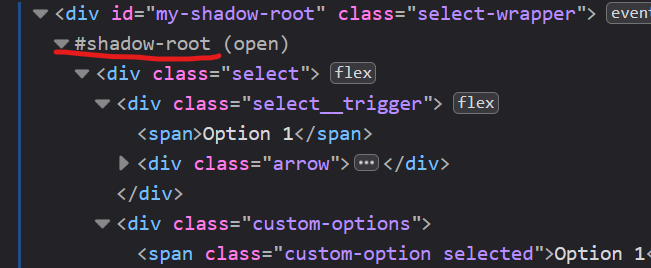
There are no items in it but when you click on it, some items are populated. Sure, there was a JavaScript and CSS code that produced options in runtime. Some developers are skilled enough and make it appears inside a pseudo-select tag (i.e. top level div), like this:
You can see it visually, but it’s not easy to search for it programmatically.
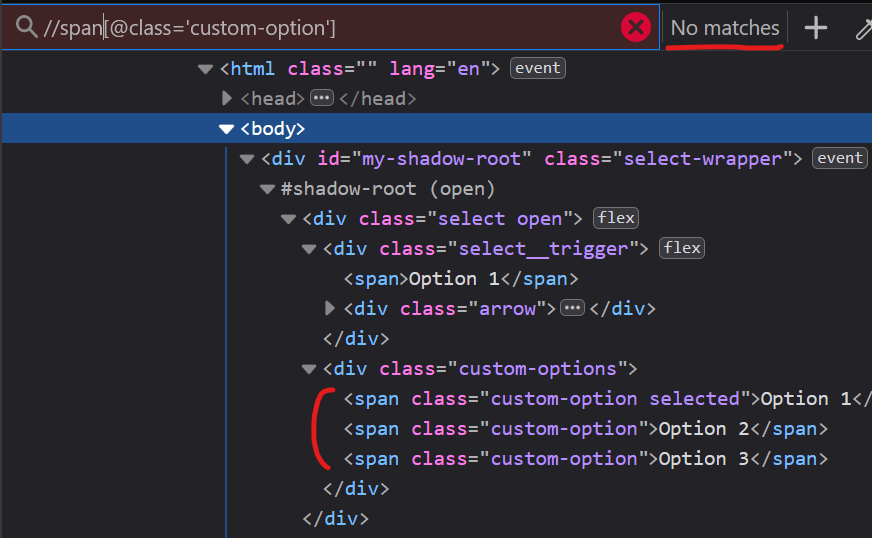
XPath fails
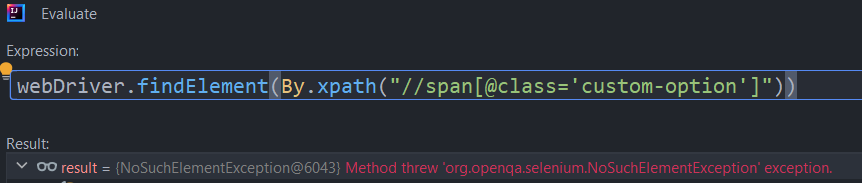
Let’s try to search for it using XPath:
//span[@class='custom-option']
Oops, nothing…
But it is there! XPath will not work inside a #shadow-root. What a pity…
Selenium can do it!
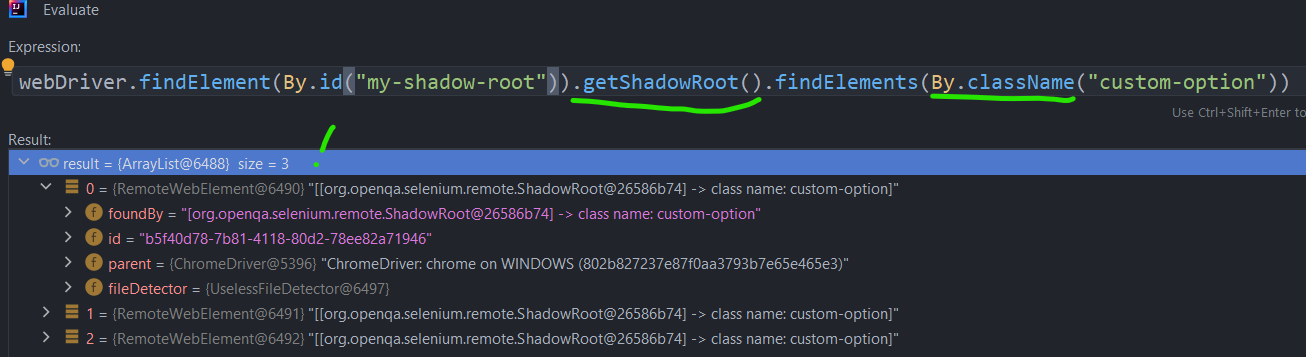
Well, pure JavaScript can do it too, and Selenium uses those methods to achieve the same goal.
Let’s first replicate that unsuccessful search with Selenium:
Pay attention, that not all “By.*” methods work fine inside a shadow-root. For the moment (Apr’2023), only by class and by id are working.
A worst-case scenario
There are a lot of modern-day frameworks like Angular and ReactJS, that require a few developers’ work and can do a lot of magic by itself. So, it is quite possible, if you collaborate with a regular developer with a powerful framework in hands, you will see still empty combo box and this code somewhere in the DOM:
How to link those options with your combo box element (keeping in mind that class name is a random, obfuscated string)? The answer is: “Sorry, but no way”.
The only way is to explain to the developer what Software Testability is, and ask them to change their code in order to have a reliable way of identifiying elements.
Summary
I believe that sometime, all browsers will have a support of XPath looking inside shadow DOMs and Selenium will introduce a more natural way of working with those elements.




 although highly useful, still requires human review for completeness and correctness.

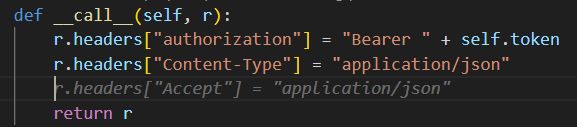
 However, if a prediction is declined and replaced with a manually written line, the tool will still attempt to predict the same suggestion for the subsequent line, which can become frustrating for the developer after multiple occurrences.
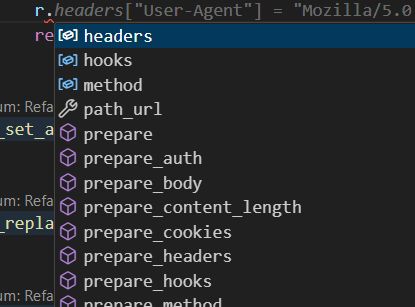 In contrast, the built-in IDE completion tools typically provide multiple options, as seen in the popup shown in the same scenario. This demonstrates that while AI completion can be helpful, its current implementation still trails behind traditional code completion systems in terms of flexibility and speed.
 When the change was in deletion of class field (mapped database table column):
 The proposed commit messages were (white was human printed, grey – AI propositions):
 Or:
Or:
 As seen in this instance, the AI lacks the sophistication to create insightful commit messages and typically defaults to generic or overly simplistic suggestions.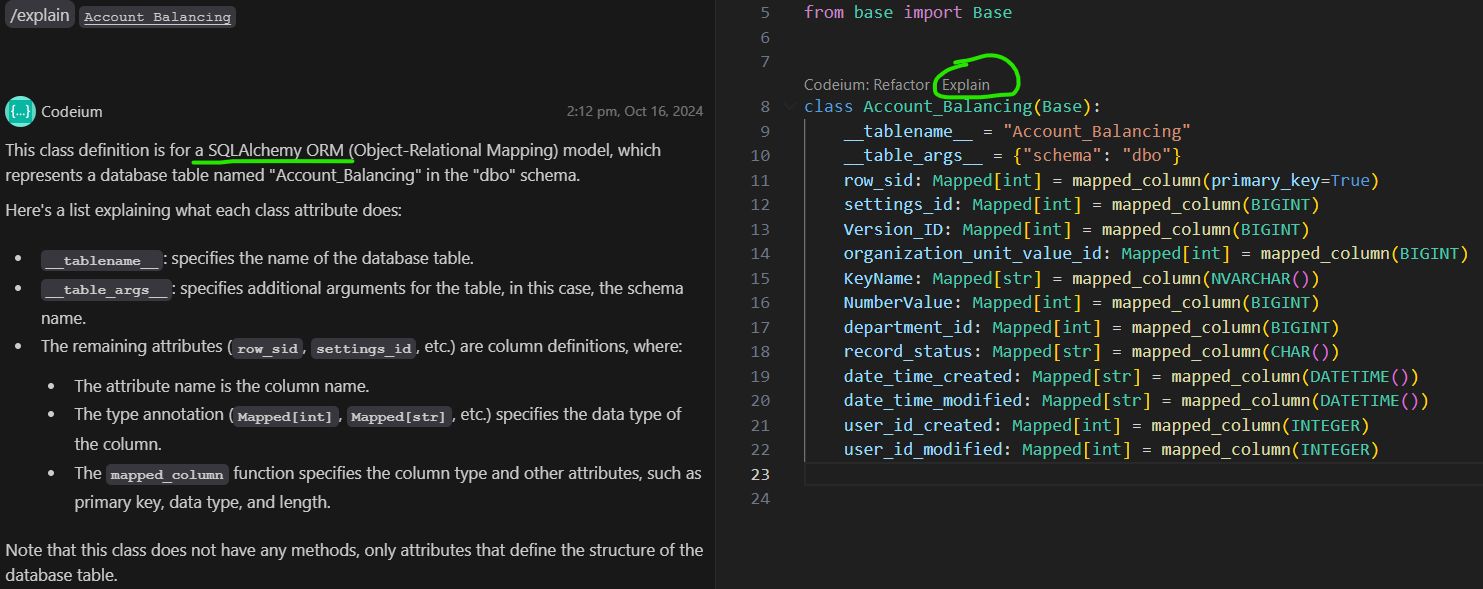
 A refactoring with:
 resulted in the next code:
 Here you are (that’s right, it’s a carbon copy):
 The answer was:
 The function to call looks like this:
 As a result, the parameter usage was entirely incorrect.
 Danny Briskin, Quality Engineering Practice Manager
 Danny Briskin, Quality Engineering Practice Manager
 Danny Briskin, Quality Engineering Practice Manager
 Danny Briskin, Quality Engineering Practice Manager

 You can see it visually, but it’s not easy to search for it programmatically.
 But it is there! XPath will not work inside a #shadow-root. What a pity…